Home > PC Assembly > Install Sound Card
How to Install a Sound Card in PC (Step by Step)
Beginner's Guide to Installing PCIe Sound Cards Onto a Desktop Motherboard
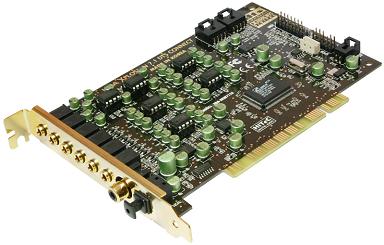
Installing a sound card is a straightforward process and simply requires slotting it into a spare PCIe (PCI Express) slot onto your desktop computer's motherboard, and following basic PC building safety guidelines while you do so (wear an anti-static wrist band/strap or regularly ground yourself by touching metal before handling your parts). Once the sound card is installed, you'll need to install the latest drivers from the manufacturer's website. Let's go over each step of how to install a sound card in more detail.
Related: The Best Sound Cards for Gaming
Note: If you're installing a sound card in an existing computer, power down your system and unplug the computer from the wall. This is a precaution you must follow when working on the inside of a computer.
1. Find the Right PCIe Slot for Sound Card
Modern sound cards use a PCIe (PCI Express) connection, so a sound card needs to be installed into a spare PCIe slot on your motherboard. Motherboards have different types of PCIe slots. You have large PCIe x16 slots for installing graphics cards (the x16 indicates the amount of lanes of the slot, which relates to speed). Then you have smaller PCIe slots, for example PCIe x4 or PCIe x1 slots, which is where you install add-on cards such as sound cards (or for installing PCIe wireless cards).
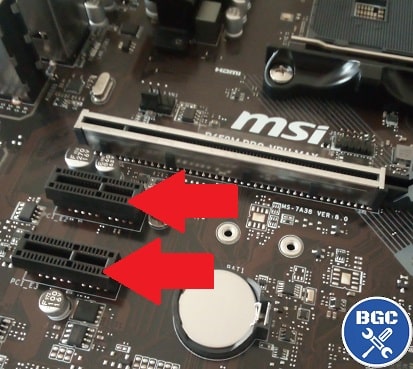 These smaller PCIe slots are where sound cards are installed
If you have a wide graphics card that takes up multiple PCIe slots (ie hovers over it), the topmost small PCIe slot in your system may not be the ideal place to install your sound card.
The graphics card could be taking up so much space that makes it impossible to actually install a sound card there, or, the graphics card might be so close to the slot that installing the sound card there would negatively affect airflow within your system. In either of those cases, use a lower PCIe slot for your sound card.
But what about the large PCIe x16 slot? Is it possible to install a sound card there if you don't have a graphics card (or if your motherboard has more than one large PCIe x16 slot)? It's entirely possible to install a sound card in a PCIe x16 slot.
But if you have a graphics card installed in a PCIe x16 slot on your motherboard, I would avoid installing a sound card in a secondary PCIe x16 slot (if your board has two) as there is the chance that you would see a tiny decrease in performance of your graphics card (since the sound card would be taking up a little bandwidth by being in that x16 slot, even despite it not running at x16).
2. Remove Rear Case Bracket
Once you know which PCIe slot to install the sound card into, unscrew the metal bracket on the rear of the case which aligns to that slot. Use a Phillips-head screwdriver (with a head size #2 as explained in the PC building tools guide).
You need this metal bracket removed so that the rear of your sound card can poke through the back of your PC (so that the input ports face out the back). Keep the screws handy as you'll need them in just a second to secure the card once you've inserted it onto the motherboard.
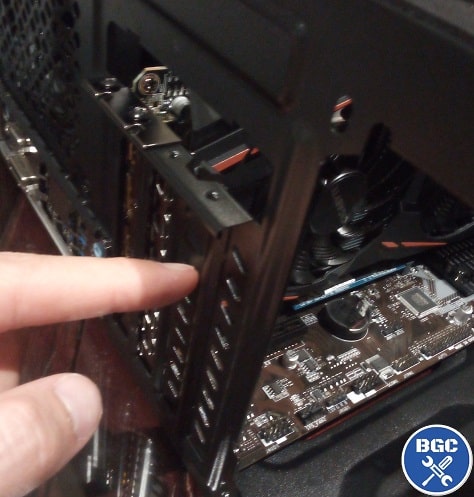 Remove the rear expansion bracket that lines up to the PCIe slot
3. Insert Sound Card in PCIe Slot
Take the sound card out of its box and protective bag. Hold it by its rear metal bracket - do not touch the green circuitry. Insert the card into the PCIe slot, making sure the bottom connectors align with the PCIe slot and the metal bracket aligns with the back of the case (so that the input ports of the card stick out the back of your computer).
Gently push the top of the card into the slot until it is securely in place. Now screw the card into the rear bracket of the case using the screws you removed just before, and you're done. That's basically all there is to know on how to install sound cards.
Does a Sound Card Need Drivers?
Yes, once your sound card has been fitted you will also need to download and install the latest drivers for that model from the manufacturer's website. You should always get the latest drivers online as the ones that may have come with your sound card on CD/DVD may be outdated, and you always want the latest drivers so your card runs at its best and so any potential bugs/issues have been fixed by the manufacturer.
Related: Best Software for New PC Builds
Trusted VPNs
VPN software is quite important in this day and age and will improve the security and privacy of your PC when online. There are also benefits to using VPNs for gaming.
There's lots of VPNs out there but the ones I recommend most to gamers is ExpressVPN (special link that gets you 3 months off. they also offer a free trial here) and NordVPN which are both highly rated gaming VPNs because they're the fastest and most secure.
Popular Articles (or see the latest articles)
Search the Site
About the Author
Indie game dev currently working on my first public release after years of hobby projects, a story-driven VR FPS built with Unreal Engine (to be announced soon here for anyone into VR FPS's). Also likes writing about tech, which also helps fund development of the game.
My favs of all time are OOT, Perfect Dark, MGS1, MGS2, GE007, DKC2, THPS3, HL1, and HL2, with the most recent addition to my list of immortals being the VR masterpiece Alyx. If you want help with a new build feel free to ask on the main PC builds guide. If you found the site extra helpful and wish to support the work I do here, sharing an article with a friend helps a lot and is much appreciated. - Julz

|
ABOUT BGC Helping you build or buy better systems for less, here at Build-Gaming-Computers.com you'll find simultaneously comprehensive yet simplified guides and tutorials, including continuously updated PC build examples, in-depth game requirement guides for the latest demanding titles, one of the most detailed PC assembly photo tutorials online, and always objective and non-biased buying guides and advice.  |
Intro | Best PC Builds | PC Assembly | Prebuilt PCs | VR Headsets | Privacy | Contact | Sitemap

Copyright (C) 2023 Build-Gaming-Computers dot com All Rights Reserved
As an Amazon Associate we earn from qualifying purchases
For the Love of Gaming + Flawless Frames