Home > PC Builds > Best PC Cases
How to Choose the Best PC Case
Beginner's Guide to Computer Case Specs + Features That Matter
 Cases vary greatly in their quality, features, and airflow
Last Updated: July 3, 2026
Choosing the right computer case for a new custom gaming PC is a vital piece of the puzzle when selecting parts. Having a high airflow case is important if you're building a fast PC that includes high performance components (such as a powerful CPU and/or graphics card) as it will allow your system to breath and operate at lower temperatures. This will extend the longevity of your PC, as well as help to keep noise levels down, and the hotter your surrounding environment, the more important this becomes. Besides airflow, there are other considerations to take into account choosing the best PC case, so let's cover all the basics you need to know as a beginner.
See Also: How to Build Your First PC
PC Case Sizes (mITX vs mATX vs Mid vs Full Towers)
Computer cases come in all shapes and sizes, from little Mini ITX boxes you can fit on your lounge room TV stand, all the way to massive heavy towers that could probably house a dozen GPUs. There's also a great variety of different styles out there, from low-key sleeper black boxes to RGB-covered centerpieces that steal the limelight in any dimly lit room.
When choosing a PC case, you'll want to think of size first. The first thing to know about choosing a compatible PC case for your build is that your case must be compatible with the motherboard you choose. Motherboards come in different sizes, technically called its ‘form factor’. The most common form factor is ATX, which is a regular sized motherboard if you will. Then you have Micro ATX (mATX), which is a bit smaller than ATX. Mini ITX (mITX) is even smaller than mATX. On the other end of the spectrum you have Extended ATX (E-ATX), which is a wider/fatter version of ATX.
So, if you have an ATX motherboard, which is the most common size, then you must choose a case that supports an ATX motherboard (any Mid Tower or Full Tower). mITX motherboards can only be installed in mITX cases. mATX motherboards can be installed in mATX cases, but also in many regular ATX cases too (called a Mid Tower). E-ATX motherboards only fit in certain Full Tower cases.
Don't worry if you're confused, as it's quite simple once you get the hang of it. Basically, all you need to know is there are 4 common motherboard sizes (mITX, mATX, ATX, E-ATX), and 4 common case sizes:
- Mini ITX Tower (supports mITX motherboards)
- Mini Tower (supports mATX motherboards)
- Mid Tower (supports ATX and sometimes also mATX motherboards)
- Full Tower (supports ATX and sometimes also E-ATX motherboards)
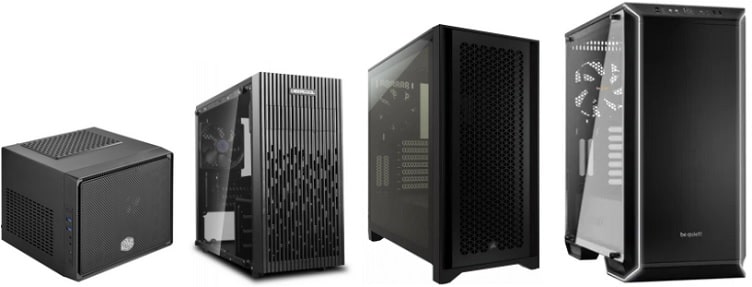 Rough Comparison of Mini ITX, Mini Tower, Mid Tower, and Full Tower cases (not exactly to scale)
Most people building a gaming PC choose a Mid Tower case, as it's not too big but not too small. Mid Towers also have the largest range in terms of models to choose from. But if you're lacking space - perhaps you have a small desk and don't want a big tower taking up a lot of room - getting a Mini Tower is fairly common. They're also typically cheaper than Mid Tower cases, so can be a good option for those on a tight budget (though there are also premium Mini Tower options out there).
Just do not confuse Mini Tower cases and Mini ITX cases. Mini ITX cases are a bit less common, as some of them are so small and compact that it makes component compatibility quite limited (far less options), as well as making installation and maintenance a little more difficult too. Mini ITX cases not only require a mITX motherboard, but potentially also a special SFF (Small Form Factor) power supply, and you won't be able to fit a large graphics card. Your future upgrade options will also be limited. Plus, in small cramped spaces where components don't have much room to "breathe", airflow can be poor, potentially leading to higher temperatures and/or a louder PC.
If you understand the limitations, and are willing to do extra research on choosing the right compatible parts, Mini ITX cases can be great for sitting on your TV cabinet if you're into lounge gaming with your PC (or for PC VR). I don't recommend them for most first-time PC builders though, as it's generally a lot simpler and easier to go with a Mini Tower if you want to save space (they're not as small, but still compact enough for most people wanting a smaller case).
Then there's Full Towers, which are the largest cases on the market, but generally unnecessary for most people unless you're assembling a system with a ton of components such as a rack of a dozen hard drives, a fully fleshed out water cooled gaming PC, multiple optical drives, or if installing an extra large graphics card. Full Tower cases can also be easier to do cable management. But unless you know that you need a Full Tower case you should probably just stick with a Mid Tower (or Mini Tower if you're tight on space), as there are many that have plenty of room to work with.
How to Choose a Case with Good Airflow
Since modern gaming is strenuous software that demands a lot from PC hardware (mostly your graphics card and CPU), the airflow of your PC build is an important consideration. The more powerful your PC, the more important of a consideration it becomes. Internal components such as your CPU cooler plays a key role in how effective airflow will be within your system, but your choice of computer case is a big factor as well. Specifically, the design of the case, and whether or not it encourages easy movement of air from outside the case, through the inside, and out the back.
This flow of air from the front to the back of the PC is the most common airflow configuration, but keep in mind some cases work in other ways such as from the back or bottom to the front or top (though less common). Knowing if a case is well designed for effective airflow is a matter of reading trusted expert reviews such as Gamer's Nexus just to name one (who do a great job reviewing cases for airflow, but also for noise and overall quality/features). You'll find that most of the best airflow cases have a mesh front panel, instead of a solid panel (which allows the front fans more easily draw air in from outside the case).
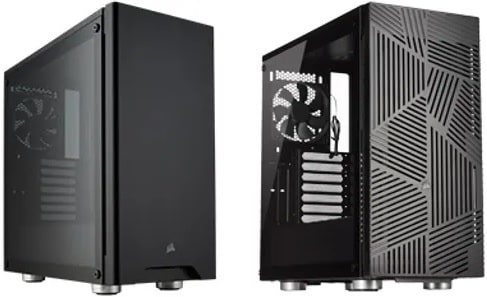 The front mesh panel of the Corsair 275R Airflow (pictured right) allows for better cooling than the standard 275R (left) with its solid front panel
But another pivotal feature to look for when choosing a good case for airflow is the amount, size, and quality of the fans included with the case. You can almost always add additional fans to a PC case though, so if a particular case doesn't come with enough fans out the box, or if those fans are of low or average quality, that doesn't immediately rule out said case as a good option. The specs of a case will always list how many and which size fans you can add on.
How Many Fans Does a Gaming PC Case Need?
Not everyone can be bothered buying and installing extra fans in their PC - the convenience of having a nice set of pre-installed fans in a case is always nice. If that sounds like you, or if you are interested in adding fans to your case but are planning how many you need, this section is for you.
Generally, most cheap or mid-tier sort of computer cases will ship with 1 or 2 pre-installed fans. Upper mid-tier and high-end cases can come with 3, 4, or even more in some instances. But do how many fans do you need? There's no single one size fits all answer, and it depends on how powerful your gaming PC is, how many of your internal components could use some extra air blowing their way, whether your case is well designed for airflow in the first place, how hot your room is, and so on.
But to paint a very broad brush here to give you a general overview, for most budget to mid-range gaming PC builds, you are likely to be fine with just 2 fans - 1 in the front (sucking cool air in) and 1 in the back (blowing the air out). For more high-end gaming PC builds, you'll want to consider 3 fans as a minimum (typically 2 in the front, and 1 in the back). Anything more than 3 fans is either a luxury, only required for very powerful high-end machines that need every extra bit of cooling they can get, or something people do if they want a ton of RGB fans.
Other Things to Look for When Choosing a PC Case
Let's go over some other features and specs to be aware of when picking the right case for your gaming PC.
- Style: Many cases have a see-through side panel (often made of tempered or acrylic glass) that shows off your internal components. If you want to be able to see into your case, you obviously need to choose one that has a window like this, but if your PC will live under your desk it's not a feature that matters, and you may be able to save a little money by choosing a case with a solid side panel design (closed design).
- Front Panel USB Ports: Cases come with varying amounts of front-facing USB ports for easy access (found on either the front or the top of the case). If you need a certain amount of front USB ports, and/or if they need to be USB 3 (or USB-C), don't forget to check the case specs. Oh, and if your case has a USB C port on the front panel, you need to choose a motherboard that has a USB-C front header (not to be confused with rear USB-C connections on a motherboard).
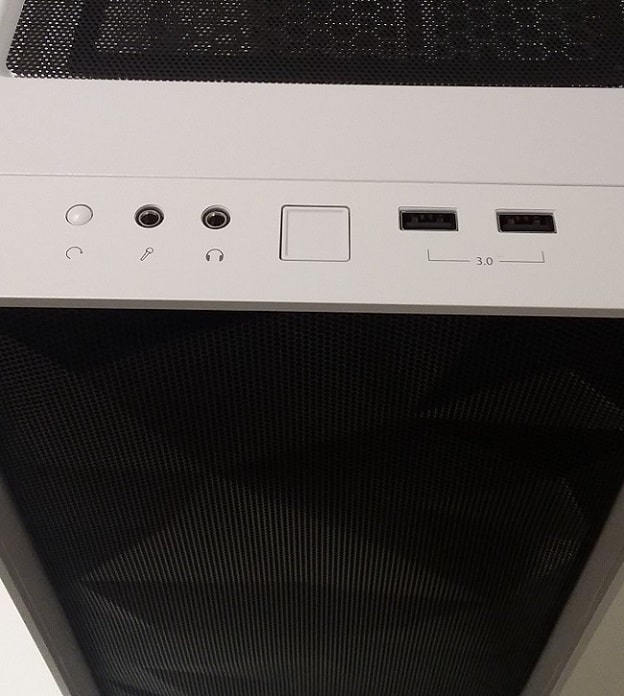 The front panel of the Meshify C, featuring 2x USB 3.0 ports
- Optical Drive Bays: If you're installing an optical drive (DVD or Blu-ray drive), you will need a case that has a 5.25 inch drive bay. Not all cases come with one, as these days optical drives are optional when building a PC (since everything is digital nowadays).
- SSD/HDD Drive Bays: Cases come with varying amounts of storage bays/slots. There are 2.5 inch bays for holding SSDs (Solid State Drives) and 3.5 inch bays for HDDs (older, traditional Hard Disk Drives). Any half-decent modern case should have enough of either for your needs, but if you're installing a high amount of storage drives than check the case specs. Keep in mind some cases have SSD slots hidden behind the motherboard tray area.
- Tool-less Design: You'll notice some cases list something along the lines of "tool-less design" in their product specs, which simply means that you don't need a screwdriver in order to remove and re-attach the side panels and can you can do so simply with by using the included thumb screws with just your hands (the case's storage bays mays also have a tool-less design too). This isn't a must-have feature but it is handy for quicker and easier assembly (and maintenance).
- Cable Management: One factor that may be important to you when choosing a good PC case (depending on how much you care about keeping your build nice and tidy) is finding out from reviews whether a case is easy to do cable management with. Cases that are easier to work with than others when it comes to managing cables will have plenty of holes on the case's motherboard tray to feed cables through when wiring up your system, as well as space behind the motherboard tray (or elsewhere within the case) where you can neatly tuck cables away from sight. Some cases go the extra mile and provide pre-attached Velcro straps that make bundling cables together quick and easy (instead of having to add straps or twist/cable ties yourself). On the other end of the spectrum, a case that is bad for cable management will typically have little to no extra room behind the motherboard tray and/or little to no holes on the tray itself for feeding cables.
- Case Material: The actual material your case is made of affects the overall durability and quality, as well as its potential for cooling your system. Cheaper cases tend to be made of plastic which isn't all that durable for the long haul, but on a tight budget it might be your only option. Higher quality cases are made of metals such as aluminum or steel, which are much better for durability. You can find out which materials a case is made of within its spec sheet.
- Dust Filters: Some cases have a removable dust filter or two, which helps to catch dust from entering your system (dust build-up is not good and will lessen airflow effectiveness over time). This is handy if your PC lives in a dusty environment, or if you have a cat or two snooping around as I do right now. The downside is that dust filters can limit airflow a little, though if you clean them often it shouldn't be a problem (run them under water and let them dry every few weeks or months depending on your usage levels). Overall, dust filters are not absolutely crucial, but a handy bonus to have.
- Price: If you want to be as cost-effective as possible and don't care to get the fanciest looking case with luxury features such as built-in RGB fans and high-quality glass panels, you can find plenty of good cheap cases suitable for most mid-range gaming PCs between the $50 and $80 range (US Dollars). For high-end gaming builds sporting powerful components that require the best airflow setup, you can find many great options between the $80 to $120 mark. Spending anything more than that on a computer case is unnecessary (overkill, if you will), and more for those wanting additional features or extra-nice aesthetics.
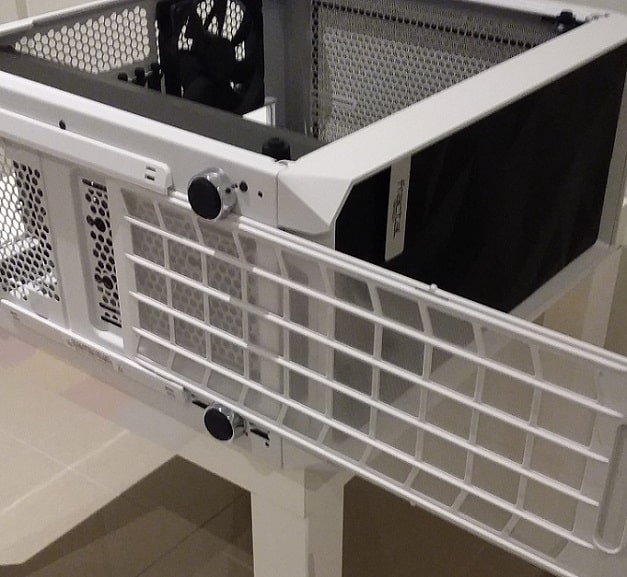 One of the 3 handy dust filters on the Meshify C
Trusted VPN
VPN software can be important in this day and age, especially if you do lots of online banking and/or use public WiFi while travelling. Having a VPN adds an extra layer of security to your PC or laptop when online to help protect your data, passwords, financials, etc from hackers or malicious programs. It can also let you access region-locked content (eg US Netflix from overseas). There are also benefits for gaming.
Because they're so popular these days, there are countless VPN providers, and it can be confusing to pick one. If you want my 2 cents, after a lot of research I decided on NordVPN 'cause it's one of the fastest, most reliable VPNs for both gaming and general use, with a lot of credible reviews out there backing that up.
Popular Articles (see all)
Search the Site
About the Author (2026 Update)
I'm an indie game dev working on my first release, an immersive VR stealth FPS coming to Steam soon. Researching, writing, and updating this site helps a little with self-funding the game's development.

I don't put ads everywhere like most tech blogs, as I find it a bad user experience, so this site is 100% reader supported: if you found the many guides on the site useful and want to help support the many hours of work that has gone into creating and maintaining them, if you make a purchase on Amazon after using any of the Amazon links on this site, I earn a tiny cut of the total sale at no extra cost to you. I also accept donations if feeling generous. Hope the site helped a little.
My Amazon Storefront (my most recommended products)
Amazon Home Links:
 |
 |
 |
 |
|
ABOUT BGC Helping you build better systems for less, here at Build-Gaming-Computers.com you'll find simultaneously comprehensive yet simplified guides and tutorials, including updated PC build recommendations. Always as objective and unbiased as possible, with no AI generated content, and little to no ads.  |
Intro | Best PC Builds | Best Tools | PC Assembly | Prebuilt PCs | My Amazon Store | Privacy | Contact | Archives | Blog

Copyright (C) 2006-2026 Build-Gaming-Computers dot com All Rights Reserved
As an Amazon Associate we earn from qualifying purchases
For the Love of Gaming + Flawless Frame Rates