Home > Best CPUs
Choosing the Best CPU for Gaming (2023)
Recommended Budget and High-End Processors for Gaming PC Builds (& FAQ)
Last Updated: March 6, 2023
Second only to your graphics card in importance, the CPU you choose also has a direct say on gaming performance. So, if you want the highest frame rates for your money, it pays to do a little research so that you can choose the current best CPU for gaming for your particular price range. In this buyer's guide we will simplify the processor market as it stands right now, hand pick the best gaming CPUs in terms of maximum bang for buck as a gamer, and we'll finish up with an FAQ on what CPU specs mean.
Choosing a CPU doesn't have to be difficult: if you simply buy within the latest 1 or 2 generations of AMD or Intel, making sure to balance your combination of CPU and GPU based on your resolution and refresh rate (and on which types of games you play), it's hard to go too wrong as you generally get what you pay for when it comes to CPUs.
But only a Sith deals in absolutes, and some CPUs do actually perform the same or better for less money than other models. So, there is some strategy involved when it comes to choosing the best CPU for new gaming PC builds. It's also very possible and actually quite easy to overspend on a CPU purchase (you see it from beginner builders in forums/Reddit etc) due to not being aware of how powerful of a CPU you actually need for modern games. The higher up you go in price, the more diminishing returns you get when it comes to gaming performance.
Unless you're aiming for consistently high frame rates of 144FPS and above for 144Hz monitors (or 240FPS for 240Hz monitors), or you're playing very CPU demanding games and want consistently high frame rates, the truth is that most/many gamers can get away with a cheap-ish modern CPU and do just fine (if you choose a good gaming GPU as well of course). So unless you have above average CPU requirements, forking out hundreds of dollars on a high-end CPU may be a waste (ie overkill). But enough generalizations and let's get into specific CPU recommendations based on 3 price categories, starting with a quick overview of how the Intel vs AMD battle currently stands.
Intel vs AMD CPUs for Gaming (2023 Update)
If you want to skip straight to the CPU recommendations, scroll down a bit, but let's look at the big picture of AMD vs Intel and how the battle stands right now. For a large chunk of hardware history, choosing the best CPU for gaming could be easily summed up by the following: if you wanted the highest frame rates possible, you bought Intel. If you wanted to save money and sacrifice a little on performance, you went AMD instead.
But over the past few years, with each new iteration of their impressive Ryzen series, AMD stepped up their game to the point where they overtook Intel for the gaming performance crown with their Ryzen 5000 series (Ryzen 3000 was also quite good for gaming). Intel clinched the gaming crown back with their impressive 12th-gen series, then AMD released their latest Ryzen 7000 series which retook the lead once more with the very fast Ryzen 7 7700X, Ryzen 9 7900X, and Ryzen 9 7950X (all of which either slightly beat or equal the Intel Core i9 12900K).
Related: The Best CPUs for Streaming (Encoding)
In typical yoyo fashion, Intel then went on to release their latest 13th generation CPUs last year in 2022 (codenamed Raptor Lake) which switched things back up into Intel's favor thanks to the very strong gaming performance of the 13600K, 13700K and 13900K. But it's not a black and white advantage for Intel - the current Intel 13th-gen vs AMD Ryzen 7000 battle is a very heated one, with performance benchmarks across the web being very close between the two cutting-edge series (especially for gaming).
Intel's current flagship, the i9 13900K, edges out the competition as the single fastest gaming CPU right now, but AMD's Ryzen 7 7700X and Ryzen 9 7900X come very close (and sometimes beat the 13900K depending on the specific game in question). In more value oriented segments of the market, it's also a tough battle, with the differences between mid-range AMD and Intel processors being very minimal.
Overall, choosing either Intel or AMD for a new PC build isn't going to make a discernible difference to the majority of gamers/users, assuming you stick with a modern CPU within the latest 1-2 generations from either company. A few extra frames here or there (higher frame rates) is hardly noticeable unless you're a PC performance enthusiast or game developer who can notice these things (or if you're a content creator and benchmarking hardware etc).
But if you really want to fine-tune your purchase and ensure you select the very best CPU for gaming for your particular budget, in order to fully maximize gaming performance and get the highest frame rates, let's stop with the generalizations and get into the specific best CPUs for gaming (and for VR gaming) at the time of writing broken up into different categories. If you want examples of how to include the best gaming CPUs below into a full PC parts list, including which motherboards and RAM to use, see the latest best gaming PC builds guide for a truck-load more detail on selecting value parts.
Note: Any prices mentioned are in USD (US Dollars)
Best Cheap CPUs for Gaming Under $150 (2023)
Top Recommendations:
- Intel Core i3 12100F (if < $100)
- Intel Core i3 12100 (if < $120)
Honorable Mentions:
- AMD Ryzen 5 5500 (if < $100)
- Intel Core i3 13100F (if < $110)
- Intel Core i3 13100 (if < $130)
When it comes to building a cheap gaming PC right now Intel currently has an edge with their attractively priced Core i3 12100 and 12100F. These are only 4-core CPUs but pack a punch in games, being able to run any demanding AAA game quite well. The AMD Ryzen 5 5500 and 5600 are Intel's competition in this price segment, but they are beaten by the i3 CPUs in most gaming benchmarks, and in most regions you can find an i3 for cheaper than both. But even if you find the 12100/F and the 5500 or 5600 around the same price, the Intel CPUs still get my top pick right now for a budget gaming PC build because they are the more flexible option in terms of upgrade flexibility as well.
See Also: How to Install a CPU
With Intel 12th gen motherboards, you have another Intel generation (13th gen) that you can upgrade to, whereas the 5500 and 5600 are based on an AM4 socket which ends at the AMD Ryzen 5000 series (AMD's latest Ryzen 7000 series are based on a brand new AM5 platform). Note the 12100 and 12100F are essentially the exact same processor with the only difference being that the "F" model lacks integrated graphics. If you're building a PC with a graphics card, there's no need for integrated graphics in a CPU, which makes the 12100F the most bang for buck seeing as it's a little cheaper.
For the few out there who are building a PC without a graphics card for a temporary period of time (perhaps you plan to buy one later), consider the 12100 instead otherwise you'll be stuck without any display until you install a graphics card in your rig. Just note that the built-in graphics of the 12100 is not good for gaming at all, so if you do want good built-in graphics performance from a CPU you want to look at AMD's 5300G, 5600G, or 5700G instead (which all have far superior integrated graphics that are actually capable of some light modern gaming at 1080p low settings).
Best Budget CPUs for Gaming Under $250 (2023)
Top Recommendations:
- Intel Core i5 12400F (if < $170)
- Intel Core i5 12400 (if < $190)
- AMD Ryzen 5 5600 (if < $150)
Honorable Mentions:
- AMD Ryzen 5 7600 (if < $220)
- AMD Ryzen 5 7600X (if < $250)
- AMD Ryzen 5 5600X (if < $170)
- Intel Core i5 13400F (if < $210)
- Intel Core i5 13400 (if < $230)
Moving up to the mid-range tier, and it's a similar story with Intel's 12th-gen i5 range still being hard to ignore for overall value right now with the i5 12400 and 12400F being quite competitively priced (and which can be paired with cheap DDR4 RAM and the affordable B660 motherboard chipset).
When you look at competing budget AMD CPUs, the Ryzen 5 5600 and Ryzen 5 5600X, these CPUs perform neck and neck with the 12400/F but they are based on the now end-of-the-road AM4 platform. With the 12400/F you can still upgrade to 13th-gen in future if you wanted, whereas with AM4 you can't upgrade to Ryzen 7000 in future as those CPUs use the AM5 socket. But overall, it's a close call between the 12400 / 12400F and the 5600 / 5600X, and you can't go wrong with either.
The only reason I would get a 5600 or 5600X is if you find it for the same price as the 12400F or 12400, AND you also don't plan on ever upgrading your CPU. Or, if you know for sure that the 5600X performs faster for other demanding non-gaming applications that you plan to use (or if the 5600X performs faster in your favorite game/s such as CSGO where AMD shines). But overall, if I had to stick my neck out, the 12400F is the best value right now in the "mid-range" CPU market.
I would even choose the 12400F (or 12400) over the recently released 13th-gen i5 range, the i5 13400 and 13400F, as these new processors cost a little over $200 US and are therefore quite a bit more than the 12400F and 12400 (but aren't all that much faster). If the 13400 or 13400F come down in price though, then there's worth looking at if you want the latest 13th-generation.
As for choosing between the i5 12400F or 12400 (or 13400F and 13400), remember that the "F" model simply means it has no integrated graphics, which isn't a problem if you're buying a dedicated graphics card (as the far majority of gamers will be doing). So unless you have a need for integrated graphics (as a backup solution, perhaps) the 12400F will save you some cash and is the best bang for buck.
If you want to spend a bit more on a processor for even higher frame rates, AMD's best upper mid-range CPU right now is their latest Ryzen 5 7600 and Ryzen 5 7600X from the fresh new Ryzen 7000 series. But these CPUs require spending more money on a DDR5 compatible motherboard, as well as investing in some DDR5 memory too (both of which cost more than DDR4 motherboards and RAM) because the Ryzen 7000 series only runs on DDR5.
At slightly higher price points are AMD's latest Ryzen 5 processors, the 7600X and the just-released non-X 7600. But their value proposition overall isn't as attractive as the 12400/F right now for those on a budget, seeing as the Ryzen 7000 series will require a DDR5 motherboard and DDR5 RAM, both of which will set you back more money than building an Intel setup with the 12400/F. The 7600 and 7600X are noticeably faster than the 12400 and 12400F, but whether the extra overall cost of buying into the Ryzen 7000 series is worth it depends on how much you're willing to spend now, as well as how much you care about future upgrades in a few years time (Ryzen 7000, with its new AM5 socket, is more flexible for the long term compared to Intel's 12th gen series).
The Best CPUs for Gaming Under $400 (2023)
Top Recommendations:
- Intel Core i5 13600KF (if < $300)
- Intel Core i5 13600K (if < $320)
- AMD Ryzen 7 7700X (if < $400)
- AMD Ryzen 7 7700 (if < $370)
Honorable Mentions:
- Intel Core i7 13700KF (if < $380)
- Intel Core i7 13700K (if < $400)
- AMD Ryzen 7 5800X3D (if < $400)
Before getting into the absolute best gaming CPUs available right now, just a quick heads-up that for most gamers, there's honestly no strong need to get anything faster than one of the mid-range CPUs above (i5 or Ryzen 5). Processors like those will easily reach 60FPS and higher in modern titles if you have a mid-range graphics card as well.
Those CPUs will also do decently well for 144Hz monitors in many games, allowing you to reach 100FPS+ unless it's a very CPU intensive game, and they're also enough for a great VR experience. Just wanted to drive this point home because some people understandably might assume that an Intel i5 or Ryzen 5 range is not good enough for a high-end gaming PC, when the truth is they are all that most people need.
Even an i3 or Ryzen 3 is plenty for many gaming situations (such as 60FPS, which typically does not require too much from the processor unless it's one of the more CPU demanding games out there). But if you do want the highest frame rates you can, to take full advantage of a 144Hz monitor and reach that magical 144FPS mark (and do so consistently), or to simply better handle CPU intensive titles and eliminate the potential for any stuttering whatsoever, the very best CPU for gaming on the market right now besides the overpriced i9 13900K (which is technically the fastest) is a tie between the AMD Ryzen 7 7700X and Intel Core i7 13700K. Both of these CPUs beats the i9 12900K in most games and get very close to the i9 13900K, and choosing between them is quite difficult as gaming performance is neck and neck.
The non-X Ryzen 7 7700 is also not far behind at all in terms of gaming performance, and will save you a little money without losing much performance at all. Plus, with the 7700, you get a pretty decent included cooler in the box, whereas with the 7700X you need to buy your own cooler as it does not come with one. Other good options would be the i5 13600K or 13600KF, which unlike AMD latest Ryzen 7000 series can support either DDR4 or DDR5 memory and motherboards, meaning that you can save a bit of money building a DDR4 system and only minimally lose out on gaming performance (DDR4 vs DDR5 gaming performance is very close overall, at least for the time being). Overall, when building a new PC today you can't go wrong with either a 7700, 7700X, 13700K, 13700KF, 13600K, or 13600KF. They're all very fast gaming CPUs, and there's no need for anything faster and more expensive such as a 13900K which isn't the best bang for buck compared to the aforementioned processors.
The Ryzen 7 5800X3D is also worth a mention, despite it being on the now soon to be obsolete AM4 platform. The 5800X3D is the latest release in the Ryzen 5000 series, and not to be confused with the older 5800X, the 5800X3D features new 3D V-Cache technology that boosts gaming performance quite significantly over the original 5800X and even matches the i9 12900K in some games (while losing in others). It's worth considering at the right price if you're wanting to stick to the AM4 platform instead of going for the new and shiny AM5 (which costs more overall as AM5 motherboards can be expensive, and there's the fact that DDR5 costs a bit more too which is the only type of memory that AM5 supports). But if you're upgrading an existing system from a previous AM4 processor, the 5800X3D is a great choice. For fresh new PC builds though, if going for AMD over Intel, I would go with AM5 to be "future proofed" because AM4 is at the end of the road in terms of upgrade potential down the line.
See Also: The Best PC VR Headsets (SteamVR)
How to Choose a CPU (FAQ)
If you're new to hardware, let's cover some common beginner questions on choosing your first CPU.
What is a CPU? How Much Does it Matter for Gaming?
Let's start at ground zero. The CPU (Central Processing Unit), also called the processor, is one of the most important components in any computer, and what you could consider the brains of your system. It's responsible for making all the quick mathematical calculations that your games and other programs rely on, and the power of your gaming computer's CPU will have a direct correlation with overall gaming performance. It's the second most important component in a gaming PC, only trailing the graphics card in its influence on your frame-rate.
So with that said, when upgrading or building a computer for gaming you want to get the best CPU that you can afford, assuming that you've saved aside a similar or larger chunk of your overall PC budget to a good (or great) graphics card. However, while you do want the best CPU possible for gaming, there is a point of diminishing returns where you may be better off skipping on a high-end CPU (for a mid-range CPU) and allocating that extra money you would have spent elsewhere in your parts-list. Building a PC is a balancing act.
Do You Need a High-End CPU for 144Hz Gaming?
144Hz monitors have become increasingly popular in recent years to the point where they are now considered the standard for any competitive gamer playing fast-paced eSports or FPS shooters like CSGO, Valorant, Fortnite, Apex Legends, PUBG, Overwatch, Warzone, and even MOBA's like League of Legends and DOTA 2. For these highly competitive, every-millisecond-counts games, seeing the fastest image on screen is important to allow for the most Jedi-like reflexes and reaction times. But to take full advantage of a 144Hz monitor, your PC needs to perform at 144FPS or thereabouts, and ideally even higher so that your frame rate doesn't drop below that 144FPS mark. To get 144FPS requires a stronger CPU compared to getting say 60FPS on a standard monitor, so you need to pay more close attention to your CPU selection if using a 144Hz screen.
Related: Best CPU GPU Combos for 144Hz
That said, you don't necessarily need a high-end CPU to achieve 144FPS, because when you run competitive graphics settings (ie lower settings, a common thing to do in order to get the highest frame rate possible which is more important than graphics quality during competitive gaming) it's not as hard for your PC to reach such high frame rates. But how good your CPU needs to be all depends on the specific game, as requirements can vary wildly. Getting 144FPS in CSGO is quite easy, and even a cheap gaming CPU will do the trick, whereas getting that type of performance in a more CPU intensive modern competitive shooter like Warzone will require a much better CPU. It's all about doing your research and analyzing benchmarks online for your specific CPU and the game in question.
Are i3 or Ryzen 3 CPUs Good Enough for Gaming?
Intel's Core i3 and AMD's Ryzen 3 range of CPUs are their entry-level offerings aimed at gamers on a budget, though they can still pack a surprisingly decent punch despite being the entry-level chip of any Intel series, and depending on the situation may actually be plenty of processing grunt for the games you play. Especially this very latest 12th-gen Intel i3 range, the 12100 and 12100F, which actually outclass the Ryzen 5 3600. For the most demanding, CPU intensive games on the market though, or if wanting to get super high frame rates of 144FPS and beyond in moderately demanding games, you really do want an i5 or Ryzen 5 instead if at all possible. But on a budget, a R3 or i3 can be well worth it, so I wouldn't discount them just because they're on the lower end of the CPU stack and comparably cheaper than other CPU families.
What Are CPU Cores and Are They Important for Gaming?
CPUs have varying amounts of cores, which are basically like microprocessors within a processor allowing for a CPU to run more efficiently and multi-task better. A CPU with 2 cores is called a dual-core processor, 4 cores is quad-core, 6 cores is hexa-core, and 8 cores is octa-core. But we'll stop there, because for gaming, cores aren't that important, so long as you have a certain amount. Modern games don't utilize that many, and a good quad-core or 6-core CPU goes a long way when paired with a good graphics card.
You'd only need higher than 6 cores if you're buying one of the absolute best gaming graphics cards and you want to avoid bottlenecking it (ie prevent it from performing at its absolute best). Put another way, anything more than 6 cores (ie 8 cores) is just a nice-to-have luxury when it comes to building a gaming PC. For more CPU-heavy non-gaming applications, that's when having really high core counts like 10, 12, or even 16 cores can be more beneficial and/or important (but it depends on your specific workflow).
What Are CPU Threads?
Whilst a core is the physical hardware that does the processing, a thread is a single line of commands that a core works on, with each program/application having at least the 1 thread. Normal CPUs can have one core only work on the one thread at a time, whereas hyperthreaded CPUs can work on up to two threads per core which generally means faster multitasking performance.
What Are Locked vs Unlocked CPUs
A locked CPU means that the clock speed is set and can't be changed by overclocking, whereas an unlocked CPU is, you guessed it, an overclockable CPU. Unlocked Intel processors have a "K" in their model number, such as the Intel Core i5 8600K. AMD don't have this naming system, but most of their CPUs are unlocked. If you want to overclock your processor, or plan on potentially doing later on, then you'll need an unlocked model. However, if you're not overclocking, which is what we'd recommend to first-time PC builders and hardware beginners in general, you can get either a locked or unlocked model as locked CPUs can still be a good buy even if you never plan to overclock.
What is the CPU Socket Type?
This is the type of CPU, and will need to be matched against the socket type of the motherboard you choose for your build. In other words, if you decide to go with an AMD Ryzen CPU, they have a socket type of AM4. Therefore, you'll need to get an AM4 motherboard. For the latest Intel i3s, i5s, and i7s, they all have a socket of "1151", so you'll need to get a motherboard that mentions socket "1151" in the model number/specs sheet somewhere.
What is CPU Clock Speed?
The stock speed that the processor runs at, measured in GHz. Not the only factor, but a good baseline of how fast a CPU is. However, when choosing the best CPU for gaming, you should not confuse yourself with having to compare clock speeds of different processors, as you're better off (to stay sane and for practicality) just comparing CPU benchmarks in various gaming situations if you want to compare different CPUs.
What is CPU Cache?
CPUs have varying amounts of what is called cache memory, which is memory that stores information your CPU will likely need next that it can quickly and conveniently access for better performance. If that doesn't make sense, no worries at all, as it simply does not matter when choosing the best CPU as you should just be comparing models (and not minutia) as mentioned before.
Is the Stock CPU Cooler Good Enough for Gaming?
The best CPUs produce quite a bit of heat when put under load and require high-performance cooling in the form of a heatsink and fan. Most processors come with their own stock CPU cooler (which consists of a heatsink and fan) so in that case you're not required to buy your own CPU cooler, which is technically known as an aftermarket CPU cooler (as in, it's not an Intel or AMD cooler).
Though keep in mind some CPUs do NOT come with a cooler, such as Intel's unlocked processors like the 10600K, 10700K, 9700K, etc (any CPU with a "K" on the end) as these processors are generally intended to be overclocked at least a little and require an aftermarket cooler.
Related: How to Install Stock AMD Cooler
Speaking of overclocking, if you're gonna be delving into that (for those who don't know it's basically when you manually increase the speed of your CPU past its stock speed to squeeze out more performance) then you'll need an aftermarket CPU cooler as your chip is going to produce a lot more heat when pushed beyond its normal stock-standard speeds.
Even if you don't plan on overclocking your CPU, which isn't recommended for newbies to be honest, getting an aftermarket cooler (ie replacing the stock fan) may still be a good idea (depends on your specific build) to maximize cooling, increase the lifespan of your CPU, reduce noise as much as possible, oh and for looks as well - stock coolers can be plain/ugly and when you buy your own you can get one that fits your build's look and feel.
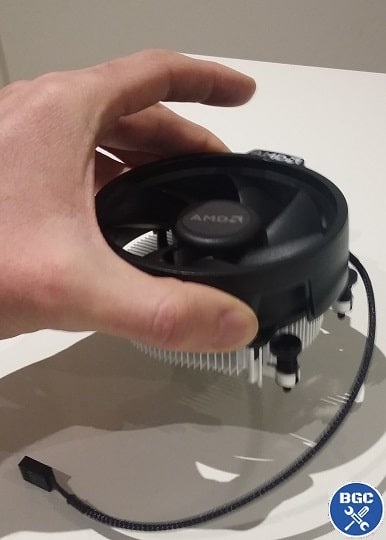 The included AMD coolers are quite decent if not overclocking your CPU
Related: How to Install a Cooler Master Hyper 212
Getting your own cooler is also a little more important in general with Intel CPUs, as their stock coolers are typically not as good as AMDs (this is fact, not opinion, though that's not to say that AMD stock coolers are significantly better; only slightly). However, if your CPU comes with a stock fan then you don't NEED to buy your own, and you could get away with using it to save money on your build (again, especially if it's one of the latest Ryzen stock coolers which are generally great), and you could just test out the stock cooler to see if your CPU runs cool and quiet enough for your liking, and then decide later on to get an aftermarket cooler (although it's annoying having to uninstall the stock cooler and install a new one).
See Also: Installing the NH-D15 Black
To summarize this sometimes confusing conundrum of a choice (if I had a galactic credit for every time someone asked me this I'd name my wallet Jabba) - if you're overclocking, you really should buy your own CPU cooler, unless your CPU doesn't come with a cooler in the first place in which case you have no choice but to buy a cooler. Otherwise, if not overclocking now or in future, you can choose either to stick with the stock cooler (if your CPU comes with one) or still buy your own better cooler anyway for improved cooling performance, lower noise, and better longevity for your system overall.
Trusted VPN
VPN software can be important in this day and age, especially if you do lots of online banking and/or use public WiFi while travelling. Having a VPN adds an extra layer of security to your PC or laptop when online to help protect your data, passwords, financials, etc from hackers or malicious programs. It can also let you access region-locked content (eg US Netflix from overseas). There are also benefits for gaming.
Because they're so popular these days, there are countless VPN providers, and it can be confusing to pick one. If you want my 2 cents, after a lot of research I decided on NordVPN 'cause it's one of the fastest, most reliable VPNs for both gaming and general use, with a lot of credible reviews out there backing that up.
Popular Articles (see all)
Search the Site
About the Author (2026 Update)
I'm an indie game dev working on my first release, an immersive VR stealth FPS coming to Steam soon. Researching, writing, and updating this site helps a little with self-funding the game's development.

I don't put ads everywhere like most tech blogs, as I find it a bad user experience, so this site is 100% reader supported: if you found the many guides on the site useful and want to help support the many hours of work that has gone into creating and maintaining them, if you make a purchase on Amazon after using any of the Amazon links on this site, I earn a tiny cut of the total sale at no extra cost to you. I also accept donations if feeling generous. Hope the site helped a little.
My Amazon Storefront (my most recommended products)
Amazon Home Links:
 |
 |
 |
 |
|
ABOUT BGC Helping you build better systems for less, here at Build-Gaming-Computers.com you'll find simultaneously comprehensive yet simplified guides and tutorials, including updated PC build recommendations. Always as objective and unbiased as possible, with no AI generated content, and little to no ads.  |
Intro | Best PC Builds | Best Tools | PC Assembly | Prebuilt PCs | My Amazon Store | Privacy | Contact | Archives | Blog

Copyright (C) 2006-2026 Build-Gaming-Computers dot com All Rights Reserved
As an Amazon Associate we earn from qualifying purchases
For the Love of Gaming + Flawless Frame Rates