Home > Best GPUs
Best GPUs for Gaming/VR (2026 Guide)
Current Top Recommended Graphics Cards for Budget and High-End PC Builds

Last Updated: July 18, 2026
If you're choosing a graphics card for your next PC build or upgrade, in this guide I've listed the current best value GPUs for gaming or VR at different price segments in my humble opinion. At the end is a general FAQ covering some common questions when shopping for the right graphics card. If you want to see how these GPUs fit into the overall picture when planning a full PC parts list, see the example PC builds as well. Let's get straight into the recommended cards.
Best Budget GPU for Gaming/VR: GeForce RTX 5060 8GB
Check Price: Amazon US
As the market stands right now, for 1080p resolution gaming or entry-level VR, the NVidia GeForce RTX 5060 8GB is probably your best bet in terms of overall bang for buck. In many games, depending on settings, at 1080p it'll get you that smooth 60FPS. For less demanding games it's also okay for 1440p monitors, but 8GB of VRAM is not ideal for high resolution gaming. It'll also struggle in the absolute most graphically demanding games.
It's also a decent budget GPU for VR gaming, so long as you're not playing overly demanding VR games or mods. For example, it's absolutely fine to run some of VR's best titles including Half-Life: Alyx, Blade and Sorcery, Metro Awakening, and many multiplayer VR games.
Just keep in mind you're not doing yourself many favors when it comes to future proofing your system by buying a GPU with 8GB of VRAM in 2026, so I'd only suggest getting a 8GB card like the RTX 5060 if you absolutely can't afford spending a little more on a 12GB-16GB card which will last longer and have more resale value in future.
Honorable Mention: Intel Arc B580
Best Value GPU for Gaming/VR: Radeon RX 9060 XT 16GB
Check Price: Amazon US
If you have more to spend, say around $300 to $500 USD, the only real choices right now are the Radeon RX 9060 XT 16GB or the slightly more expensive (but faster) RTX 5060 Ti 16GB. There are 8GB versions of these cards which are cheaper, but if you're looking for a card in this price segment I can't recommend getting a graphics card with 8GB of VRAM as you're shooting yourself in the foot when it comes to longevity and ability to run graphically demanding games.
If I had to pick just one, for most people the 9060 XT 16GB is probably your best bet, as you'll save a bit of money and get roughly the same performance as the 5060 Ti 16GB in most games. Just keep in mind some games run faster with either NVidia or AMD cards, so check specific benchmarks and recommendations for your favorite titles if you care about squeezing out the absolute most bang for buck for your use case (on this site there are a bunch of guides for specific games).
Honorable Mention: NVIDIA GeForce RTX 5060 Ti 16GB
Best Value High-End GPU: Radeon RX 9070 XT 16GB
Check Price: Amazon US
While the true "high end" of the GPU market has no real options apart from NVidia RTX 5080 or RTX 5090 (both of which are overpriced and only for those with 0 budget constraints who just want the absolute best GPU possible), in the upper mid-range or lower high-end market your choices of modern cards are basically the RX 9070, RX 9070 XT, RTX 5070, or RTX 5070 Ti.
Out of all of those, based on current pricing, I'd choose the RX 9070 XT as the best overall value for most people. The 9070 XT is considerably cheaper than the 5070 Ti, but comes close in pure gaming performance. However, if you want the best ray tracing or DLSS experience, NVidia cards do outshine AMD, so in that particular case I'd lean towards NVidia. For VR gaming, AMD is still fine, as there's no ray tracing (and rarely DLSS) for VR games and mods.
Honorable Mention: NVidia GeForce RTX 5070 Ti 16GB
How to Know a GPU Will Fit? (Case Compatibility)
The actual physical size of a video card may be an issue when it comes to compatibility with your other components, especially if it's a large/long GPU and you don't have a huge case. Rule numero uno when choosing the right graphics card for your PC build is to confirm that your case will fit your new beast by checking the maximum supported GPU length found on the spec sheet of your case compared to the length of the specific GPU model you're planning on getting.
GPUs also vary in both how many PCIe slots they take up on the motherboard (they only plug into one but can hover over other PCIe slots) as well as how many rear metal brackets they take up in your case. These may be worth checking if you either have an extra large or wide GPU and are worried about compatibility, or if you're building in a small case and want to ensure your GPU will fit both your motherboard and case. See our guide to graphics card slot sizes for more on this.
How Much Should You Spend on a Graphics Card?
As mentioned, the video card is the single most crucial component of all in regards to how fast/smooth your games will run, and at what graphics quality settings you'll be able to run them at. Modern games contain thoroughly complex, detailed and dynamic 3D scenes with all sorts of special rendering and lighting effects thrown on top, which can really tax your system heavily. The better your graphics card, the faster your computer will be able to handle all of these computations on the fly and output them on-screen, making for a smoother, higher-quality visual experience.
If your graphics card isn’t good enough for the specific games you want to play (and for the resolution and in-game graphical settings you desire to run the game at) the in-game performance is going to suffer. In other words, your frame rate will be low, which results in the on-screen action appearing to lag/stutter. At best, this slowdown can hinder your enjoyment a little, and at worst the game becomes straight-up unplayable if your frame rate dips below 20-30FPS too often so (or doesn't even run to begin with).
But how powerful of a GPU you'll be needing to buy to avoid lame lag getting in the way of your fun will differ from gamer to gamer. Factors such as the resolution and refresh rate of your monitor play a part in how much graphical grunt you'll need, but a huge determining factor as well is the types and specific games you'll be playing. Different games can vary massively in their hardware requirements.
For example, the difference in the hardware requirements of CSGO (an old title running on a fairly basic graphics engine, at least by today's standards) compared to a AAA blockbuster like CyberPunk 2077 is vast. One can run super-smooth on almost any super-cheap "potato" PC, while the other will require a fairly beefy GPU in order to get smooth performance (especially at higher settings and/or resolutions).
 Modern AAA games have impressive rendering and special effect features that'll require beasty GPUs to take advantage of
Also, if you buy a more expensive high refresh-rate gaming monitor (such as 120Hz, 144Hz, or even 240Hz), your hardware requirements will be increased further. For example, if you get a 144Hz gaming monitor, to take full advantage of that screen you'll want to aim to get around 144FPS (frames per second) which requires a more powerful GPU. Though do keep in mind that even if you get a 144Hz monitor, even getting 100FPS or so is still fine as you'll still see those extra frames. In other words, you don't need to get 144FPS if using a 144Hz screen.
Related: FPS Differences (30FPS vs 60FPS vs 144FPS)
Generally speaking, as a gamer you want to buy the best graphics card you can afford, as you'll not only get the fastest performance now but the card will last you longer without having to upgrade. But there is also the other side of the argument of overspending, as you don't want to spend money on a card that's totally overkill for your particular usage - especially if you're trying to be cost-effective like many gamers. As a real world example of overspending, if you’ll be sticking to a standard 1080p monitor that has a 60Hz refresh rate, all you need to make the most of that screen is to get 60FPS performance. So if you spend the extra money on a GPU that's capable of getting a much higher frame rate of 150FPS, you could have gotten away with a much cheaper card.
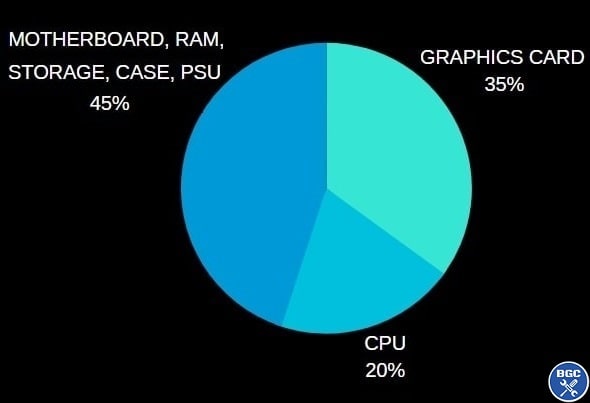 General estimates when building a gaming-focused PC. For a hybrid gaming AND workstation computer, spend a bit less on the GPU and more on the CPU (& RAM)
Above is a chart showing roughly how much of your overall PC build budget you should look to spend on the GPU if your aim is to fully maximize the gaming performance of your new PC. So for example, when planning a gaming PC build for say $1000, to maximize gaming performance you should be looking at choosing a graphics card around $350 (no less than $250 and no more than $400). Keep in mind we're only talking in terms of the core hardware components here, and not accessories like your monitor, because if we included the gaming monitor in our chart it would be too difficult to give a rough estimate percentage (as monitor purchases can vary wildly from a cheap $100 1080p 60Hz display to a high-end $1000 4K display).
Shooting for this 25 - 40% range allows you to maximize gaming performance but avoid having to sacrifice too much on your other still-important components, such as still getting a good gaming CPU, RAM and so on. Building a PC is a balancing act, and you could say your system is only as strong and reliable as your weakest link (so don't go too cheap on your power supply selection). That's why it's not practical to throw too much more than 35 to 40 percent on your graphics card choice, such as getting a 600 dollar GPU for a $1000 build, as you'd be very limited in what other parts you get.
Are Factory Overclocked GPU Models Worth It?
You'll notice some graphics card models have SC or OC in their model name, which stands for SuperClocked and Overclocked. This simply means the card is a factory overclocked model, meaning that the manufacturer has increased the clock speed of the card compared to other models within that same GPU model type. Overclocked GPUs can give you a little extra performance out the box compared to other models, without needing to overclock your GPU yourself.
These OC/SC models are a little more expensive than non-OC models, but whether they're worth it or not all depends on the specific model in question, its price relative to other cards, and how much extra performance it will give you (usually not much; we're talking perhaps 3-15FPS more depending on the situation). You're often really not missing out on much (if anything) by just getting a standard non-OC model, but if you find an OC model for around the same price then you may as well go for it.
Related: Safe GPU Temperatures Explained
Do You Even Need a Graphics Card for PC Gaming?
This may surprise some of you if you're new to hardware; technically speaking, no, you don't need to buy a discrete/dedicated graphics card when you build a computer for gaming. Say what? Some CPUs come with a built-in integrated graphics chip that is capable of outputting to a display just like a graphics card would (for these CPUs you would plug your monitor cable into the back of your motherboard instead of the back of your GPU). CPUs that have integrated graphics are called APUs (Accelerated Processing Unit) if it's an AMD processor and iGPU (Integrated Graphics Processing Unit) for Intel processors.
That means the CPU can play the role of both a processor and a graphics card, taking responsibility for doing all the rendering calculations and outputting the display to your monitor. Integrated graphics is no match for a standalone graphics card, and is only a realistic option if you're say building a PC for Rocket League or other games that have quite low requirements, and you fully understand you're not going to get super-smooth performance in the latest AAA games. Integrated graphics really can be a good value option for less demanding titles though, and especially AMD's recent APUs like the 5600G and 5300G which provide very respectable gaming performance in many popular games.
How to Know a GPU Supports Multiple Monitors?
If you're building a dual or triple monitor gaming setup, you want to choose a graphics card that specifically states that it supports the amount of displays you want. Any half-decent modern graphics card will support multiple monitors, but you want to make absolutely sure of it as some GPUs do not (especially cheaper cards).
If you go to the manufacturer's page for your specific GPU model (ie on the Gigabyte site for a Gigabyte branded model - NOT the NVidia or AMD site) then you'll see it mentioned within the spec sheet if that card supports dual, triple, or even quad monitor setups. You'll also see the types of output ports that specific card has, such as DisplayPort, HDMI, or even the older VGA connection type. If your card has both DisplayPort and HDMI ports, as is often the case, use the DisplayPort if you have the choice as it is the standard these days.
Related: The Best Gaming Monitors
Related Guides
Trusted VPN
VPN software can be important in this day and age, especially if you do lots of online banking and/or use public WiFi while travelling. Having a VPN adds an extra layer of security to your PC or laptop when online to help protect your data, passwords, financials, etc from hackers or malicious programs. It can also let you access region-locked content (eg US Netflix from overseas). There are also benefits for gaming.
Because they're so popular these days, there are countless VPN providers, and it can be confusing to pick one. If you want my 2 cents, after a lot of research I decided on NordVPN 'cause it's one of the fastest, most reliable VPNs for both gaming and general use, with a lot of credible reviews out there backing that up.
Popular Articles (see all)
Search the Site
About the Author (2026 Update)
I'm an indie game dev working on my first release, an immersive VR stealth FPS coming to Steam soon. Researching, writing, and updating this site helps a little with self-funding the game's development.

I don't put ads everywhere like most tech blogs, as I find it a bad user experience, so this site is 100% reader supported: if you found the many guides on the site useful and want to help support the many hours of work that has gone into creating and maintaining them, if you make a purchase on Amazon after using any of the Amazon links on this site, I earn a tiny cut of the total sale at no extra cost to you. I also accept donations if feeling generous. Hope the site helped a little.
My Amazon Storefront (my most recommended products)
Amazon Home Links:
 |
 |
 |
 |
|
ABOUT BGC Helping you build better systems for less, here at Build-Gaming-Computers.com you'll find simultaneously comprehensive yet simplified guides and tutorials, including updated PC build recommendations. Always as objective and unbiased as possible, with no AI generated content, and little to no ads.  |
Intro | Best PC Builds | Best Tools | PC Assembly | Prebuilt PCs | My Amazon Store | Privacy | Contact | Archives | Blog

Copyright (C) 2006-2026 Build-Gaming-Computers dot com All Rights Reserved
As an Amazon Associate we earn from qualifying purchases
For the Love of Gaming + Flawless Frame Rates