Home > Choosing a Motherboard > Sound Cards
Best Sound Cards for Gaming (2026)
& Do You Even Need an Internal PCIe Sound Card for Your Gaming PC?
Last Updated: July 29, 2026
If you're on the hunt for the best sound card for gaming, whether for a new PC build or to upgrade your existing desktop, in this buyer's guide we'll break down what to know in as concise a way as possible. In the past, installing a sound card in your PC was fairly common, but built-in audio solutions on consumer motherboards slowly improved in quality over time, and these days the audio provided by almost all modern motherboards is more than enough in terms of quality (and volume) to please most gamers.
But there are always exceptions to any rule, and sound cards aren't entirely dead. Just like optical drives such as DVD-RW or Blu-ray drives and burners - also rare inclusions in a new modern PC build - there is still a time and place where buying a dedicated sound card makes sense for certain users and situations (whether internal or external; we'll focus on the former in this guide). Let's talk about it, including my top picks of the current best sound cards for gaming at a couple different price points.
See Also: The Best PC Speakers for Gaming
Are Sound Cards Worth It for Gaming?
Let's not beat around the bush as I want to make this very clear. The short answer is an easy no - these days, literally 98% of gamers do not need to buy a sound card (and shouldn't). Long answer? The quality of audio that comes with any half-decent modern motherboard - even on more budget gaming motherboards - is good enough these days that there's simply no need, nor real benefit, to getting a sound card.
But if you're using professional-grade high-end headphones or speakers that you want to take full advantage of, and/or if you're doing some sort of audio production or editing where every little miniscule detail and quality matters, then buying a sound card may be something to consider. A sound card may also make sense if you're perhaps using an older motherboard that has slightly lower-quality audio, or if the sound on your motherboard has simply died (rare but it can happen) and you need a cheap replacement.
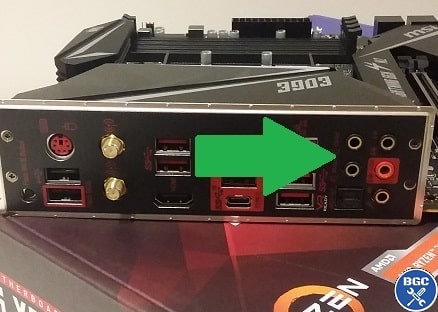 Nowadays, the audio capability of most modern motherboards is great
So, if you're in that small percentage of gamers who are investing heavily into high-end audio equipment (something on the level of the beyerdynamic DT 1990 or even the Audio-Technica ATH-M50x), let's get into our picks of the best gaming sound cards to power such great headphones starting with the best budget internal sound card suitable for more entry-level professional audio gear, and then onto the best high-end sound card for the ultimate gaming and music playback.
Best Value PCIe Sound Card: Creative Sound Blaster Audigy Fx Pro
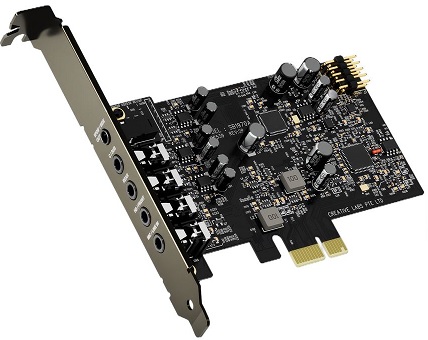
If you're after the best internal sound card for gaming on a budget without spending too much, the Sound Blaster Audigy FX Pro is my current top pick and is quite affordable relatively speaking when it comes to internal sound cards (which can get real expensive). It's a guaranteed step-up in quality from what a modern motherboard can offer, but only if you pair it with high-quality headphones or speakers to be able to hear the difference. It comes with software from Creative, allowing you tweak plenty of settings, and it supports 5.1 and 7.1 surround sound too.
It's a fairly small sound card too, with a low-profile design, meaning that it can easily fit into most custom PC builds so long as you have a spare PCIe slot free on your motherboard. For gamers and some content creators, this card may be all you need, but if you need a high-end professional grade sound card, you may need an even higher-quality card which we'll get to next.
Best PCIe Sound Card: Creative Sound Blaster AE-7
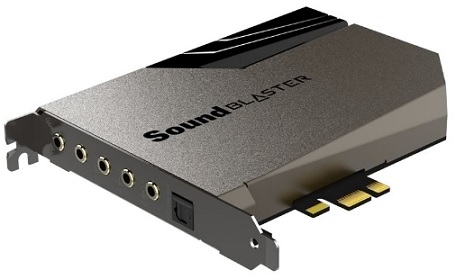
If you're willing to invest in a more mid to high-end internal sound card for the ultimate gaming setup, and that will work well as a solid music production card too, I'd suggest the Creative Sound Blaster AE-7 which is better value overall for most people than the fairly more expensive AE-9 model. Again, make sure your headphones or speakers will actually take advantage of such a high-quality card, otherwise you're wasting your money. Hard to go wrong with a Creative sound card, as they're industry leaders and have been for so long.
But as with all recommendations on this site, take my opinion with a grain of salt and always do your own research. Here's the official comparison of their PCIe sound cards for starters. While I strive to give the best, most accurate recommendations that I can by analyzing the current market, everyone has different needs. I'm also not a music professional, and personally I stick to onboard motherboard audio as my needs for audio are basic like most gamers. Anyway, hope these suggestions help steer you in the right direction, and let's get into a quick summary of some sound card specs for anyone interested.
How to Choose a Sound Card (FAQ)
Internal vs External Sound Cards for Gaming
If you ask serious music pros about configuring the ultimate setup, some may scoff at the thought of cramming an internal PCIe sound card inside your computer case squeezed between your graphics card and power supply, as this can cause electronic interference that may get in the way. While this may be true, it's not always the case, and most people using an internal sound card probably won't encounter this problem (just be aware of it, and if you're worried, do your own research into how to avoid it, or how to fix it if you encounter it).
Most audio professionals will recommend an external sound card setup, which could mean getting a DAC, AMP, ADC for a mic, and VSS/software. However, this isn't necessary if you're just a gamer or music lover wanting to take full advantage of your high-end gear, a good internal sound card may be all you need and also keeps things simple. A high-quality internal sound card can allow for some seriously high-quality audio. But for music production/editing/etc, do look into an external setup.
Sound Card Compatibility With Your PC Build
As for picking a sound card that's compatible with your computer, there's not much to it, but still a couple things to consider.
- Modern internal sound cards will be PCIe (PCI-Express) cards that plug into a spare PCIe slot (usually x1 size - the short PCIe slots) on your motherboard. So all you need to ensure compatibility is to check if you have a spare PCIe slot underneath your graphics card that will fit your sound card. Just be aware in some PCs, if your graphics card is wide it might block other PCIe slots.
- Some internal sound cards are powered directly by the motherboard (via the PCIe slot), but some cards (like the EVGA Nu) will also need direct power from the power supply using either a SATA power cable (like the EVGA Nu) or a Molex power cable (most PSUs have these connectors, but not all). Any modern power supply will come with plenty of these SATA cables, so it's not something to worry about (they're the same connection type used to power HDDs and other devices like optical drives).
See Also: How to Install a PCIe Sound Card
5.1 vs 7.1 Sound Cards for Gaming
5.1 and 7.1 refer to the number of audio channels that a sound card card can support. A 5.1 sound card can support 5 audio channels (front left, front right, center, rear left, and rear right) and a subwoofer channel. A 7.1 sound card can support 7 audio channels (front left, front right, center, rear left, rear right, and two additional side channels) and a subwoofer channel. For gaming purposes, a 7.1 sound card can provide a more immersive experience by allowing for more precise localization of sounds in the game, such as enemy footsteps and gunfire.
However, many modern games support surround sound through software, and a good pair of headphones can produce the same result as a 7.1 sound card. If you're looking for the most immersive gaming experience possible and you have a suitable speaker setup, a 7.1 sound card could be a good idea. But 7.1 sound cards are not necessary if you have good quality headphones, and a 5.1 sound card is more than enough for most gamers.
See Also: The Best Gaming Speakers for the Money
What is the SNR of a Sound Card?
The SNR (Signal to Noise Ratio) is one of the notable specs of a sound card that indicates its overall quality. The SNR is a measurement of the usable signal that your sound card can produce above the volume of background static that electrical hardware produces. In other words, the SNR is a measure of the quality of the analog-to-digital (A/D) and digital-to-analog (D/A) conversion processes, with higher SNR values indicating that the sound card is able to accurately reproduce audio signals with less background noise.
For example, an SNR of 100 dB means that the level of the desired audio signal is 100 dB higher than the level of background noise. The higher the SNR the better the sound quality will be, but keep in mind that sound cards with high SNR ratings can also be sensitive to the type and quality of the cables and speakers used in the audio setup. A poor quality cable or speaker can negatively impact the overall SNR of the system.
The SNR of most sound cards fall into the range of around 80 - 130 dB (higher is better remember), but there's no set minimum SNR to shoot for when choosing a sound card. Overall, I would simply use this spec as one way to compare different sound cards and their quality.
See Also: The Best Studio Headphones for Gaming
What is the Sample Rate of a Sound Card?
The sample rate of a sound card is a measurement in kHz that gives an idea of how accurate that card can reproduce higher frequencies, with the higher the kHz the better the overall quality. Most good modern sound cards will be 96 kHz, which is more than enough for most people, so there's no point getting a card with les kHz than this. When choosing a sound card you may also see its "bit rate" mentioned, which is related to the quality of recorded audio. Any sound card worth buying will have a bit rate of 24 or higher, which is the modern standard in a sound card.
What is the THD of a Sound Card?
The THD (Total Harmonic Distortion) of a sound card is a measure of how much the output signal of the card deviates from the original input signal. Typically expressed as a percentage or ratio (eg 0.01% or 1:10,000), a high THD means that there is a lot of distortion in the audio signal, while a low THD means that the output signal is very close to the original signal. The closer the THD is to 0 the better, and the best sound cards on the market will have a low THD such as 0.001%. That said, there is no exact number to shoot for when buying a sound card, and it's just one other way to compare different cards for their quality when shopping for the best sound card for gaming.
Trusted VPN
VPN software can be important in this day and age, especially if you do lots of online banking and/or use public WiFi while travelling. Having a VPN adds an extra layer of security to your PC or laptop when online to help protect your data, passwords, financials, etc from hackers or malicious programs. It can also let you access region-locked content (eg US Netflix from overseas). There are also benefits for gaming.
Because they're so popular these days, there are countless VPN providers, and it can be confusing to pick one. If you want my 2 cents, after a lot of research I decided on NordVPN 'cause it's one of the fastest, most reliable VPNs for both gaming and general use, with a lot of credible reviews out there backing that up.
Popular Articles (see all)
Search the Site
About the Author (2026 Update)
I'm an indie game dev working on my first release, an immersive VR stealth FPS coming to Steam soon. Researching, writing, and updating this site helps a little with self-funding the game's development.

I don't put ads everywhere like most tech blogs, as I find it a bad user experience, so this site is 100% reader supported: if you found the many guides on the site useful and want to help support the many hours of work that has gone into creating and maintaining them, if you make a purchase on Amazon after using any of the Amazon links on this site, I earn a tiny cut of the total sale at no extra cost to you. I also accept donations if feeling generous. Hope the site helped a little.
My Amazon Storefront (my most recommended products)
Amazon Home Links:
 |
 |
 |
 |
|
ABOUT BGC Helping you build better systems for less, here at Build-Gaming-Computers.com you'll find simultaneously comprehensive yet simplified guides and tutorials, including updated PC build recommendations. Always as objective and unbiased as possible, with no AI generated content, and little to no ads.  |
Intro | Best PC Builds | Best Tools | PC Assembly | Prebuilt PCs | My Amazon Store | Privacy | Contact | Archives | Blog

Copyright (C) 2006-2026 Build-Gaming-Computers dot com All Rights Reserved
As an Amazon Associate we earn from qualifying purchases
For the Love of Gaming + Flawless Frame Rates